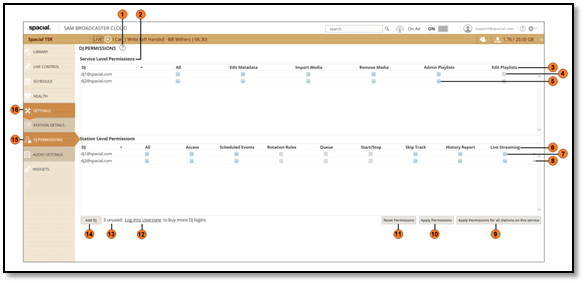
Serial | Description |
| 1 | Links to the Knowledgebase article that explains DJ Management |
| 2 | List of the permissions that can be assigned at the Service Level |
| 3 | Service Level DJ Permissions* |
| 4 | The greyed-out checkbox indicates that the permission is included with another permission |
| 5 | Check boxes with which Service Level permissions are applied |
| 6 | Station Level DJ Permissions |
| 7 | Check boxes with which Station Level permissions are applied |
| 8 | Remove the DJ, which also revokes their permissions |
| 9 | Click to apply the configured permissions to all stations under this service |
| 10 | Click to apply the configured permissions |
| 11 | Click to reset the configured permissions |
| 12 | Click to be taken to the Billing screen where additional DJ Licenses can be purchased |
| 13 | Displays the number of remaining DJ licenses available |
| 14 | Displays the Add User window, which will assign an available license to a DJ |
| 15 | DJ Permissions Tab |
| 16 | Settings Tab |
* Service Level Permissions are applied to all stations under the same service.
Comments