Serial
|
Description
|
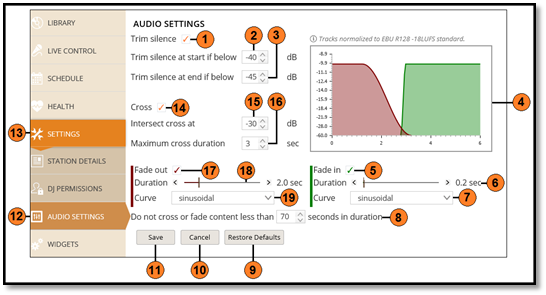
| 1 |
Engage or disengage the silence trimming |
| 2 |
Set the dB level below which is considered silence for the start of the track |
| 3 |
Set the dB level below which is considered silence for the end of the track |
| 4 |
Graphical display of the expected effect the settings will have |
| 5 |
Enable the track Fade In options |
| 6 |
Track Fade In duration slider |
| 7 |
Track Fade In waveform shape |
| 8 |
Set the track duration for tracks excluded from the cross and fade settings |
| 9 |
Restore Default settings |
| 10 |
Cancel any changes made |
| 11 |
Save any changes made |
| 12 |
Audio Settings Tab |
| 13 |
Settings Tab |
| 14 |
Enable the track Cross settings |
| 15 |
Set the dB level at which tracks should cross |
| 16 |
Set the maximum cross duration |
| 17 |
Enable the track Fade Out options |
| 18 |
Track Fade Out duration slider |
| 19 |
Track Fade Out waveform shape |
Comments